
Bring your ideas to screen with Vixel.
Vixel is an AI filmmaking workspace for turning an idea or script into a short film. Talk with the AI Director to develop your story, plan your shots and explore the look of your characters.
Every film starts somewhere
Our one-minute introduction follows three creators: an illustrator with a character she wants to bring to life, a musician imagining visuals for his song, and someone searching through references for an idea.
The opening stays close to their hands: a pencil on paper, a recording on a phone, photographs spread across a desk. These are small, familiar things. Each one holds a possibility someone cares about.
Maybe you recognize that feeling. You know the character well enough to imagine how she would move. You can hear the mood of a scene in your song. You’ve saved a dozen images because something about them belongs together. The next step is finding a way to show someone else what you see.
Shape your story with an AI Director
In the film, the illustrator turns to her laptop with a simple request: “Bring my character to life.” There’s a drawing behind that sentence, and a person who wants to see where it could go.
You can begin that way in Vixel. Tell the AI Director what you have in mind, share what you’ve already made, and work out the next part together. What kind of world does this character belong in? What might she do in her first scene? What do you want us to feel when we meet her?
Think of the Director as a creative partner you can talk things through with. It can help develop the story and break it into shots. You can ask why a shot belongs, suggest another direction or explain what feels off before moving into generation.
Your ideas, coming together
As image cards and sound waveforms gather around the illustrator, she is still sitting at her desk, holding the original drawing. The character, the world and the sound begin to share the same space.
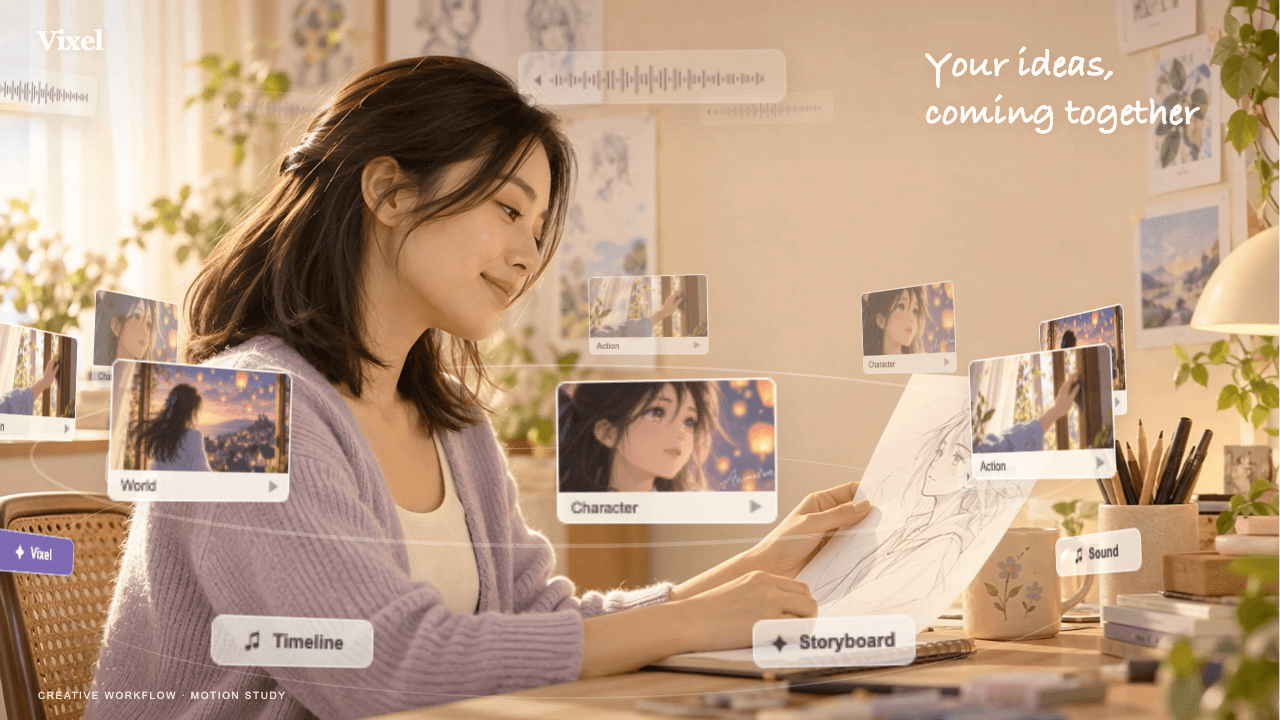
For us, that image holds the heart of the film. Your idea has somewhere to grow, and you are still the one giving it direction. A reference becomes a scene; a character finds a world; separate pieces begin to feel like they belong to the same story.
Beside another creator’s laptop, a reference gives way to a storyboard and then a preview. It makes an uncertain beginning feel approachable: here is the idea, here is how it could unfold, and here is something you can finally watch.
Give your characters a world to belong to
The warm rooms, soft window light and handwritten words give our introduction the feeling of an afternoon spent making something. Those details help the new possibilities feel close to the creators’ everyday lives.
Your film will have its own atmosphere. Bring the colors, places and character details you keep returning to, and develop them with the Director. Compare new shots with the references you’ve chosen. Does the character still feel recognizable? Does the next image belong in the same world?
You can be honest about what feels off. A room might be too polished; an expression might lose the warmth of the original sketch. Those observations are useful creative direction. You decide which details make the film feel like yours.
Our guides on planning a storyboard and keeping characters consistent walk through these decisions with practical examples.
Find the story between the shots
For the musician, the song already carries a feeling. The pictures need to find a rhythm that belongs with it. Across our introduction, close views of hands, faces and objects turn ordinary actions into a sequence you can follow.
Then the everyday rooms open into Pastel Dream: an oversized cat, stairs in the clouds, a room at an impossible scale. After watching people imagine what they could make, we get to spend a little time inside a finished imagined world.
The film returns to the creators reacting and sharing, with the words “You made it happen.” That small return matters to us. The pleasure of finishing something belongs to the person who had the idea and kept making choices along the way.
Behind our introduction
The film at the top of this page began with those three creators and grew into a 38-shot storyboard.
The making-of follows the production in detail: planning the shots, finding a softer look for the people, adding the animated cards and handwritten text in post-production, and shaping the edit around voiceover and music.
See how we made the filmHow to start your own AI short film
Borrow the illustrator’s starting point: a character you want to see in motion. Give the Director enough to begin, then make one creative decision at a time.
- Describe one moment. Who is there, what happens, and how should it feel? “My character steps into a new city for the first time. Keep the mood curious and hopeful” is enough to open the conversation.
- Shape the plan together. Share the drawing and explain the details that matter. Review the proposed story and storyboard before making images or video.
- Review what you make. Compare the shots with your references and watch how they connect. Bring specific notes back to the Director, such as a changed outfit or an unclear action.
For a fuller walkthrough, follow our first AI short film guide. When a shot needs another pass, the shot refinement guide helps you turn “something feels off” into a useful next step.
Before your first film
Do I need a finished script?
You can start with a short idea and develop it with the AI Director. Describe a character, a place and something that changes. Review the story and shot plan before generating your film’s images and video.
Can I start with a character I’ve drawn?
Yes. Share your drawing as a visual reference and explain what you want to preserve. Compare new shots with it as you work; our character consistency guide shows what to look for.
What does the AI Director help me do?
The Director helps you develop a story, plan shots and discuss the direction of your film. You can bring references and feedback into that conversation. The choices about what to keep, change and make next remain yours.
How was Vixel’s introduction film made?
Our team planned a 38-shot storyboard and combined generated footage with editing, voiceover and music. The floating cards and handwritten text were added in post-production. The making-of article walks through those choices.
Start with your idea
Bring the character you’ve been drawing, the scene you keep imagining or the first sentence of a story.
One character, one place and one meaningful moment are enough to start a conversation. You don’t have to know every shot yet. Tell the Director what you have in mind, and work out the next part together.
Start your film Read the first-film guide